(MRP – MRP History)
This screen provides a complete history of your MRP sessions, including the generation date and completed date, the number of planned jobs and POs generated, the number of actual jobs and POs converted, and whether the session was fully completed or not.
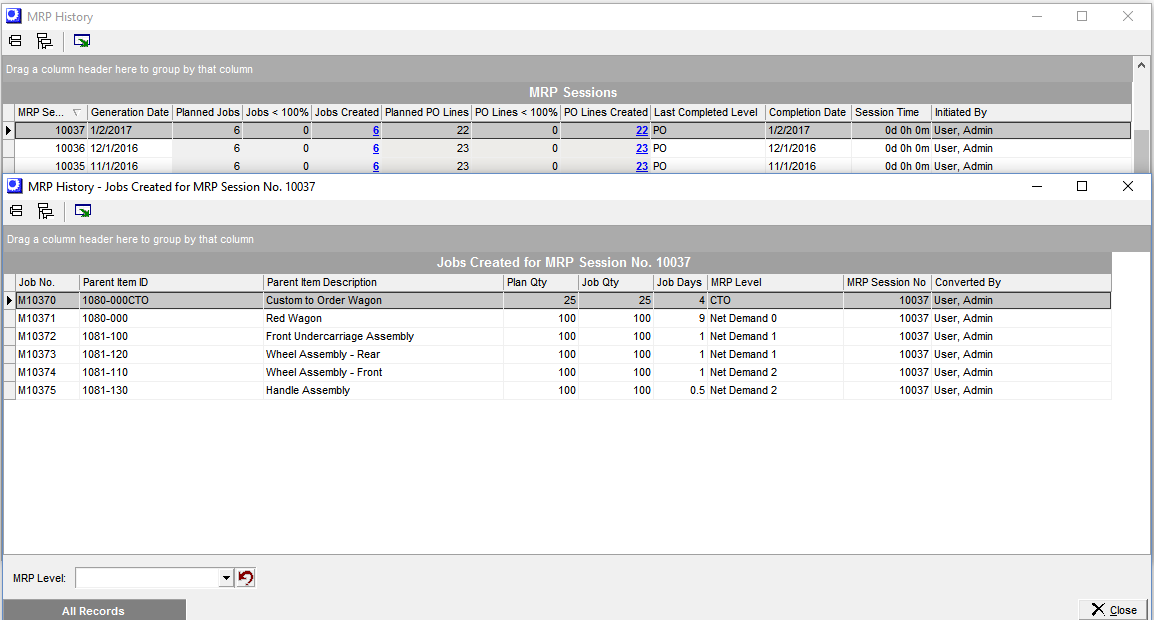
MRP Overview
You must convert all suggested Jobs and POs in an MRP Session
You must convert all suggested Jobs through all levels to meet your current requirements. The planned start dates of your converted Jobs drive the demand for your Purchased items. You must do a complete MRP run of all Jobs and suggested POs within each MRP session to ensure the integrity of your plan.
Screen Details
Bold Red values indicate a process problem
Grid values highlighted in bold red indicate that the MRP session was not fully completed thru all Jobs levels and all PO lines.
Grid Columns
MRP Session/Generation Date
Each generated MRP session receives a unique ID number and generation date.
Planned Jobs
The number of Jobs MRP suggested for conversion
Jobs < 100%
This represents the number of Jobs that were suggested and not converted. This number should be zero. If there is a value present it will be highlighted in bold red.
Jobs Created
The number of Jobs converted. There is an active drill thru to the MRP History detail that will provide all converted Job information
Planned PO Lines
The number of PO lines suggested for conversion.
POs < 100%
This represents the number of POs that were suggested and not converted. This number should be zero. If there is a value present it will be highlighted in bold red.
PO Lines Created
The number of PO lines converted. There is an active drill thru to the MRP history detail that will provide all converted PO line information.
Last Completed Level
This represents the last completed level in MRP. In most traditional MRP runs, this should be PO. If the session was not completed, the level value will be highlighted in bold red.
Completion Date
This represents the date an MRP session was completed thru all suggested levels. It is imperative that you convert Jobs thru all levels and all suggested PO lines for each MRP session.
Note: A blank completion date is a sign of poor process.
Session Time
The total time to complete this MRP session. MRP is meant to be run and completed in a timely manner and should not extend several days.
Converted By
The User that generated the MRP session.