(Purch > Analysis > RNI Analysis)
This screen provides a listing of open PO lines that have been received but not yet matched with supplier invoices in the PO Invoice screen. It can also be used to identify PO lines that may need to be manually closed. The Received Not Invoiced Analysis screen is always calculated as of today's date and does not provide a historical as-of-date view.
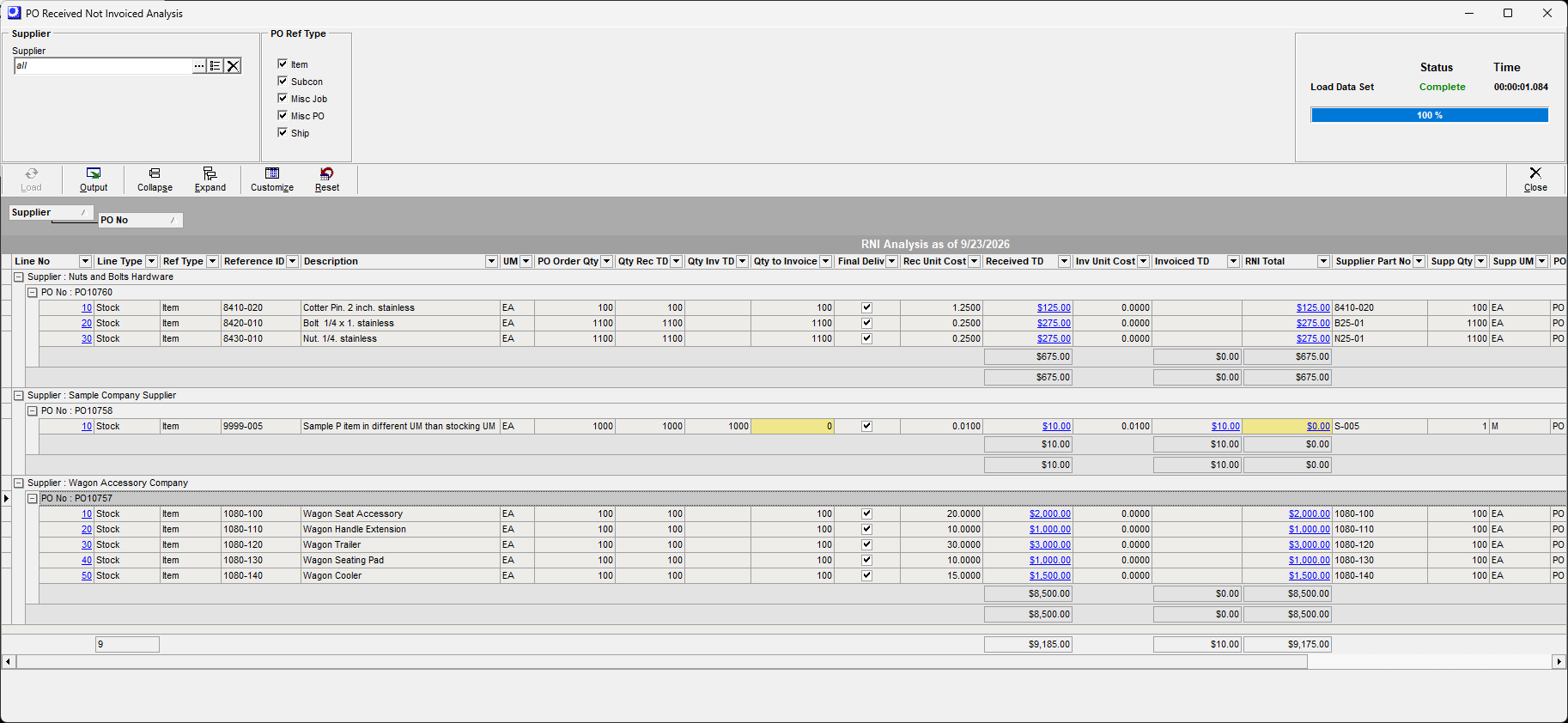
PO Invoice Overview
Supplier invoices related to purchase orders are entered and matched with Purchase Orders in the PO Invoice screen.


RNI Analysis Screen = stocking unit of measure and home currency
This screen compares focuses on matching your stocking unit of measure values in your home currency. This screen will tie down to the Received not Invoiced GL Account. The Receipt costs of your purchased materials establishes your inventory cost.
PO Invoice Screen = supplier unit of measure and supplier currency
Since your Supplier Invoice will be in the supplier unit of measure and currency, the receipted quantities in the PO Invoice screen will be in the supplier unit if measure.
PO Invoice matching of quantities and prices auto close PO lines for fully matched lines
If a PO line's total invoiced quantity matches the receipt quantity for the full order quantity or for a line that was marked as a Final Receipt quantity, the PO Line Status is automatically changed from 'Open' to 'Closed'.
Received Not Invoiced GL Account is self-balancing
When a PO line gets closed, the program compares total receipt costs with total invoice costs and posts any difference to your RNI Adjustments account, which keeps your Received Not Invoiced account balance accurate.
Some PO lines may require manual line close - Yellow Shading
There are some scenarios where a PO line does not automatically close. These lines that are fully invoiced can be manually closed by going to the Purch > Purchase Order > Detail tab and changing the PO line status to 'Closed". If all remaining lines are eligible to close, you can go to the Purchase Order Header tab and change the PO status to Closed. This will close all PO lines and close the Purchase Order.
Screen Details
Selection Filters
Optionally use the selection filters prior to loading your data set.
Supplier
Select all, one or multiple Suppliers.
PO Ref Type
All types selected by default.
Item
This is for stock item purchases.
Misc PO
This is for non-Ship descriptors manually added to a PO. These Misc Purchase Costs are recognized at PO Receipt.
Subcon
This is for subcontract lines generated from the Jobs > Job Subcontracting PO conversion process for your Job Subcontract routings. When you perform a PO Receipt of this Subcon line, there will be an automatic Job issue of Absorbed Subcontract Costs to work in process for the linked Job.
Misc Job
This is for descriptor PO lines generated from the Jobs > Job Subcontracting PO conversion process for your Job Descriptors lines (TYPE = MISC) that have a Supplier designated. When you perform a PO Receipt of this Misc Job line, there will be an automatic Job issue of Absorbed Misc Job Costs to work in process for the linked Job.
Ship
This is for descriptors of TYPE = SHIP manually added to a PO or SHIP lines created during the PO Invoice matching process. These PO Shipping Costs are recognized at PO Invoice. Ship lines do not contribute to your GL Balance for Received Not Invoiced.
Buttons
Load
Click this button to load the dataset in the grid.
Output
Click this button to output the grid contents using a variety of filtering and sorting options. You can print this report or output to Excel
Link:
Collapse, Expand
The grid supports a drag and drop grouping of data.
Customize
You can customize the fields that display in the grid.
Reset
You can Reset the grid display to the default format.
Grid Fields
All PO lines presented are Open lines that have PO Receipt transactions.
Supplier
This is the Supplier that will require a PO Invoice to match against the RNI lines.
PO Number
Be default this will display the oldest create date PO Number when grouped together. Live link to the Purchase Orders details tab.
Line No, Line Type, Reference ID, UM
This identifies the details of the PO line in the stocking unit of measure. Live link to the Purchase Order details tab from the Line No.
Ref Type
Item, Misc PO, Subcon, Misc Job, or Ship. Ship lines do not contribute to your Received Not Invoiced GL Account balance.
PO Order Qty
This is the original PO line quantity in your stocking unit of measure.
Qty Recd TD
Quantity received to date in the Purch > PO Receipt screen in your stocking unit of measure. Live link to the PO Inquiry > PO Receipts tab.
Qty Inv TD
This is the total quantity invoiced to date in the PO Invoice screen. In this analysis screen this quantity is translated to your Stocking Unit of Measure. In the actual PO Invoice screen, the quantities are in the supplier unit of measure.
Qty to Invoice
This is the total quantities receipted to date that have not yet been invoiced. This value can be negative for PO Receipt return transactions.
Yellow Shading - Review for Manual PO Line Close
The line has been completed and the Qty to Invoice is zero. These lines are eligible for manual close in Purch > Purchase Orders > Details tab by changing the line status to 'Closed'. If all remaining lines are eligible to close, you can go to the Purchase Order Header tab and change the PO status to Closed. This will close all PO lines and close the Purchase Order.
Final Delivery
This checkbox identifies the final receipt for this PO line item.
Rec Unit Cost
This is the unit cost for the PO receipts in your stocking unit of measure. For stock items this receipt cost is the basis for your average cost inventory value.
Received TD
This is the total receipt value to date in your home currency.
Inv Unit Cost
This is the PO Invoice unit cost in the stocking unit of measure and home currency.
Invoice TD
This is the total invoiced to date in home currency. Live link to the PO Inquiry > PO Invoices tab.
RNI Total
This is the Received Not Invoiced total for this line. The sum of all lines (excluding Ref Type = Ship) will tie down to your GL Account for Received Not Invoiced. Live link to the PO Inquiry > Summary tab.
Credit Memo Transactions - Negative RNI Total
▪Positive Qty PO Receipt transactions that have a negative price.
▪Negative quantity transactions when a PO Receipt transaction has been returned.
Yellow Shading - Review for Manual PO Line Close
The line has been completed and all PO receipt quantities have been invoiced. These lines are eligible for manual close in Purch > Purchase Orders > Details tab by changing the PO line status to 'Closed'. Any value in the RNI Total will get posted to the RNI Adjustment GL Account at PO line close.
Supplier Part No, Supp Qty, Supp UM
This is the cross reference supplier information. The PO Invoice screen is always in the Supplier Unit of Measure and Supplier Currency. This RNI screen focuses on the your stocking unit of measure and home currency values.
PO Type
PO Type of the Purchase Order
PO Creation Dt
Creation date of the Purchase Order
Curr Code, FX Invoiced TD
For suppliers that are in a foreign currency. This is in Financial Transfer accounting configuration only.